AI Coding Agent Security: What They Actually Send
Coding agents read your files, run your commands, and ship the results to an external model — thousands of times a day. Here is what actually leaves your network, why provider dashboards can't show you, and what an audit trail for agent traffic looks like.
Ask an engineering leader what their developers' AI coding agents send to Anthropic or OpenAI, and the honest answer is almost always the same: no idea.
That is not negligence. There is genuinely nowhere to look. The agent runs on a developer's machine, talks directly to a provider over TLS, and leaves behind a token count in a billing console. The prompts themselves — the files, the command output, the error traces — are gone the moment they are sent.
This post is about what is actually in those payloads, why the usual places you would check cannot tell you, and what closing the gap looks like.
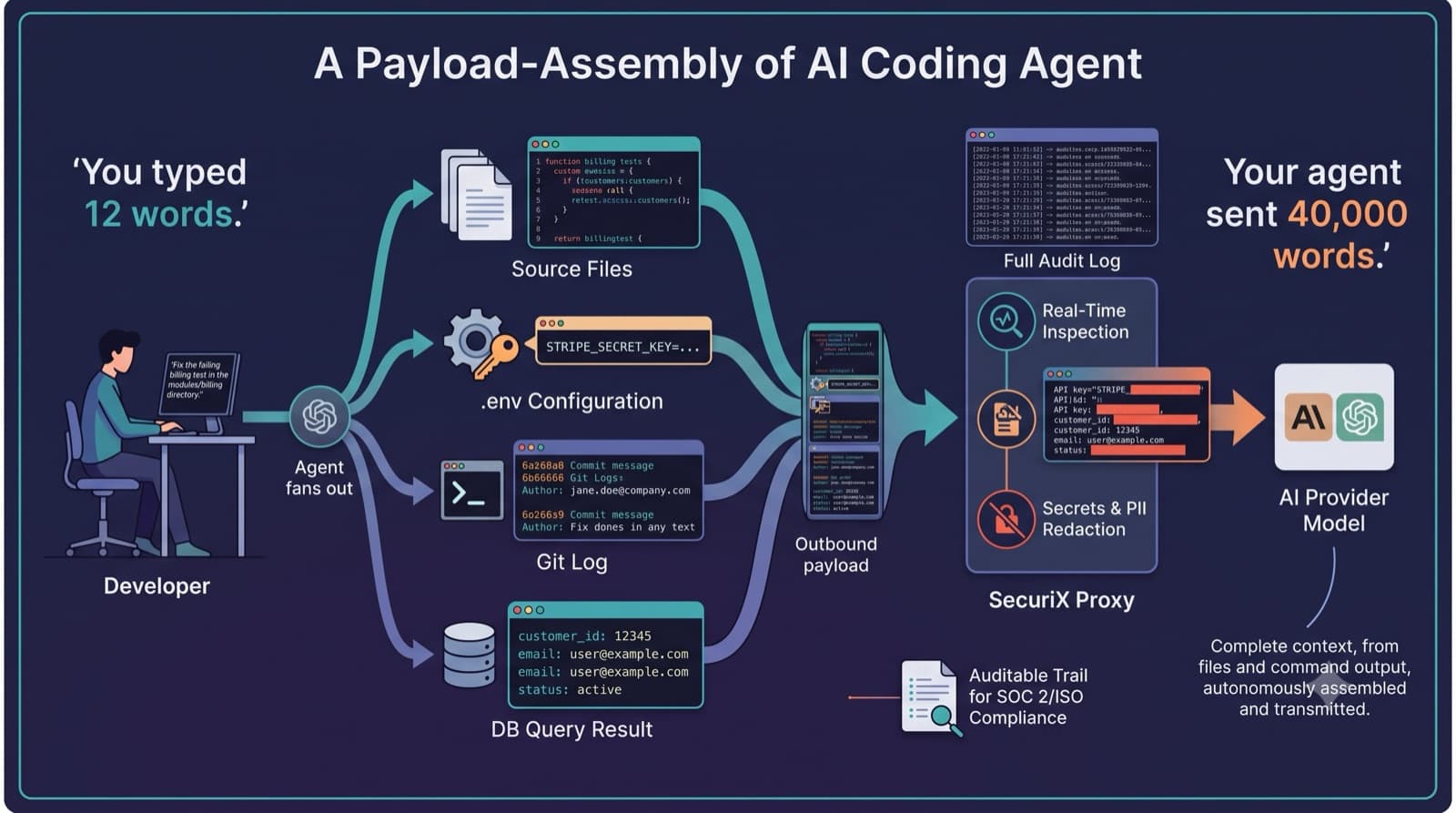
How a Coding Agent Builds Its Context
A chat assistant sends what you type. A coding agent is a fundamentally different thing: it decides for itself what to read, and it reads a lot.
Give one a task like "fix the failing test in the billing module" and it will typically:
- Search the repository to find relevant files, pulling matches into context
- Read whole files — often several, including imports and neighbouring modules
- Run commands — the test suite, a linter,
git log, a database query — and read the output - Iterate — take the result, form a new hypothesis, read more files, run more commands
Every one of those steps appends to the context sent to the model. And critically, the developer never sees the assembled payload. They see a prompt box and a diff. Everything in between is assembled by the agent according to its own retrieval logic.
That is what makes coding agents the highest-privilege AI in most organizations. They have filesystem access, shell access, and network access, and they exercise all three autonomously.
What Actually Ends Up in the Payload
Not theoretical categories — the things that routinely appear in agent context in real repositories:
Source code, well beyond the file you are editing. Retrieval pulls in adjacent modules, shared utilities, and type definitions. A one-file change frequently ships a dozen files' worth of proprietary logic.
Configuration and environment files. Unless explicitly excluded, .env, config.yaml, docker-compose.yml, and CI definitions are ordinary text files that a search can match and a read can return — live credentials included.
Command output. This is the one people underestimate. git log carries author emails and commit history. A failing test prints fixtures. A database query run to debug an issue returns actual rows — real customer records, real email addresses, real identifiers.
Stack traces and error messages. Exceptions routinely embed request payloads, tokens, connection strings, and user identifiers in their text.
Infrastructure detail. Internal hostnames, service topology, queue names, bucket paths — the reconnaissance map of your systems, described in your own configuration.
None of this requires anyone to behave carelessly. It is the agent doing exactly what it was asked to do.
The Agentic Loop Multiplies Everything
A single chat message is one request. A single agent task is many — the loop of read, reason, act, observe repeats until the task is done, and each iteration carries context forward.
Two consequences follow, and both matter:
Volume. One developer working through a normal day generates far more model traffic than the same person using a chatbot. Manual review of that volume is not a strategy anyone can execute.
Compounding exposure. Because context accumulates across iterations, a secret read in step two is frequently still present in the payload at step nine. One unlucky file read propagates through the rest of the task.
Why Your Provider Dashboard Cannot Help
The instinct is to check the Anthropic or OpenAI console. It will not answer the question, for three structural reasons:
It reports totals, not content. You get tokens and spend. You cannot see what was sent — that is the entire point of the question.
Attribution stops at the API key. If a key is shared across a team or issued per-project, usage aggregates to the key, not the person. "Which developer sent this?" has no answer in that data.
Coverage stops at the vendor boundary. Teams use several agents against several providers. Each console shows its own slice, in its own format, with no way to join them.
Meanwhile, the tools you already trust for this class of problem cannot see the traffic either. It is outbound TLS to a legitimate, approved SaaS endpoint. Your DLP sees an encrypted connection to api.anthropic.com and correctly allows it.
The Question You Cannot Currently Answer
At some point an auditor, a customer security questionnaire, or your own incident response process asks a version of this:
"For the past six months, what data did your AI development tooling transmit to third parties, and who authorized it?"
If your agents talk directly to providers, there is no answer. Not an incomplete answer — no data at all. The same gap appears when a customer asks whether their data has been processed by a subprocessor you did not declare, or when a credential rotates and you need to know whether it was ever exposed.
This is increasingly what SOC 2 and ISO 27001 reviewers probe on, because AI tooling has become the most obvious unmonitored egress path in a modern engineering organization.
What Visibility Should Actually Look Like
The requirement is straightforward once stated: the traffic needs to pass through something you control before it reaches the provider.
A proxy in that position can:
- Record the full exchange — prompt, response, model, tokens, timestamp — in an immutable log
- Attribute every call to a specific developer and agent, not a shared key
- Inspect payloads in flight and redact secrets, credentials, and PII before they leave
- Cover every provider in one place and one format
The constraint that matters for adoption: it has to be invisible to developers. If it changes their workflow, adds latency they notice, or requires a different tool, it will be routed around. The right implementation is a base-URL change — the agent's credentials and headers pass through untouched, the response is identical, and nobody's habits change.
That is precisely how SecuriX for engineering teams works: a transparent proxy in front of the coding agents your developers already use, with every existing subscription and provider agreement left exactly as it is.
See What Your Agents Are Sending
Book a demo and we'll show you the audit trail behind your team's coding agent traffic.
Frequently Asked Questions
What data do AI coding agents send to the model?
Far more than the developer types. Agents autonomously read source files, configuration, and environment files, and include the output of commands they run — test results, git log, database queries. Anything the agent retrieves to complete the task is transmitted, including credentials and customer data that happen to sit in those files or outputs.
Can I see coding agent prompts in my provider dashboard? No. Provider consoles report token counts and spend, not prompt content, and usage is attributed to an API key rather than an individual developer. Content-level visibility requires intercepting the traffic before it reaches the provider.
Will my DLP or CASB catch this? Generally not. Agent traffic is outbound TLS to an approved SaaS endpoint, which is exactly the pattern those tools are configured to permit. Without terminating the connection, the payload is opaque.
Does adding a proxy slow developers down? It should not. A correctly implemented pass-through proxy adds negligible latency and requires only a base-URL change — no SDK swap, no wrapper, no change to how anyone works.
Do we have to stop using Claude Code, Cursor, or Copilot? No. The goal is visibility, not restriction. Teams keep their existing tools and subscriptions; the proxy simply makes the traffic auditable.
Is this the same as an LLM gateway for our product? No — different problem. Gateways for the AI features you ship govern your application's model calls. This is about the coding agents your developers use. If you are building AI into your own product, see SecuriX for Developers.
The Bottom Line
Coding agents earned their adoption. They also quietly became the largest ungoverned egress path in most engineering organizations — reading files nobody reviewed, running commands nobody logged, and sending the results somewhere nobody can inspect.
The fix is not restricting the tools. It is putting a control point in the path, so that "what did our AI tooling send, and who sent it?" becomes a query rather than a shrug.
Book a Demo
See the coding agent audit trail in action — no subscription changes, one endpoint swap.
Related reading: SecuriX for Engineering Teams · Taming Shadow AI and Zombie Agents
— The SecuriX Team
Community Forum
Questions, Feedback & Discussions
Join the conversation
Recent Discussions 0 Comments
No questions yet. Be the first!