- Published on
AI Cost Optimization: The Complete Guide for 2026
Two years ago, AI spend was a rounding error on most budgets. Today it is a line item CFOs circle in red: seat subscriptions multiplying across departments, API invoices nobody can attribute, and a growing gap between what companies pay for AI and what they actually use.
This guide covers everything that falls under AI cost optimization in 2026 — what it means, where the money actually leaks, the seven levers that reliably cut spend, how to measure progress, and a 30-day plan to put it into practice.
What Is AI Cost Optimization?
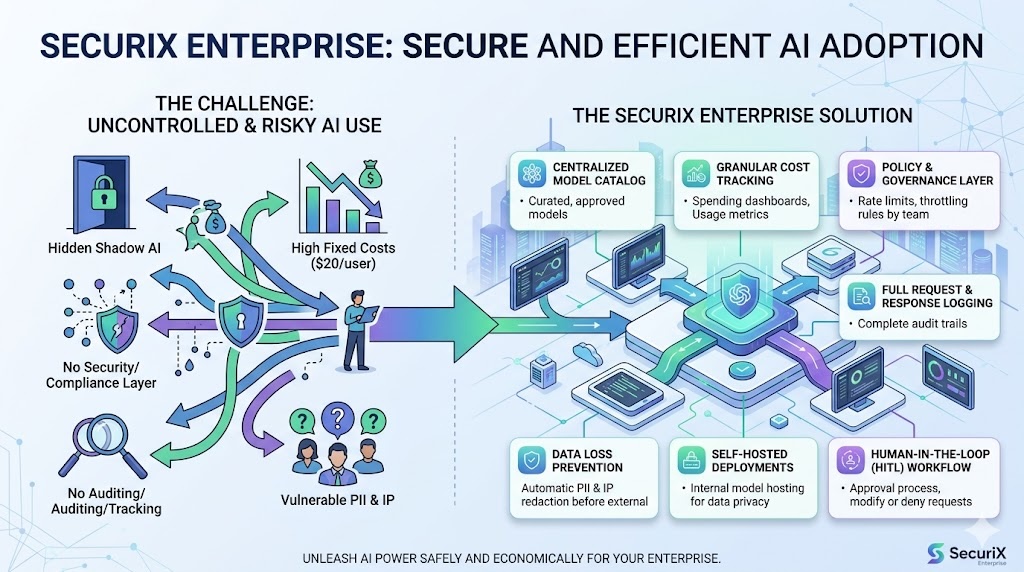
AI cost optimization is the practice of reducing what an organization pays for AI tools, LLM usage, and related infrastructure — without reducing employee access or output quality. For most companies, the biggest single lever is replacing flat per-seat subscriptions with pooled pay-per-token usage, then adding controls like team budgets, model whitelisting, and throttling to keep consumption efficient.
That definition has two halves, and both matter:
- Pay for what you use. Move from fixed fees that ignore usage to consumption-based billing that tracks it.
- Govern what you use. Once billing tracks usage, put controls on that usage — budgets, rate limits, model policies — so it stays efficient as adoption grows.
Companies that do only the first half get a one-time saving and a new problem: unbounded consumption. Companies that do both cut costs and keep them cut.
Where AI Budgets Actually Leak
Before optimizing anything, it helps to know where the money goes. Enterprise AI spend leaks in four places:
1. Idle and light seats
Per-seat AI licensing charges the same price for your heaviest engineering power user and the HR coordinator who drafts one policy update a month. In practice, usage is wildly uneven — roughly 20% of employees drive 80% of AI consumption, and engineering teams consume around 8× what finance teams do. Every light user on a full-price seat is budget leaking silently.
The numbers are not small. ChatGPT Enterprise deals in 2026 typically land between **108,000 a year before anyone sends a prompt.
2. Over-specified models
A frontier model drafting a two-line Slack reply costs 10–30× what an efficient model would charge for identical quality on that task. Without model governance, every employee defaults to the most expensive model available — because to them, it is free.
3. Ungoverned consumption
A runaway script retrying in a loop. An agent stuck re-summarizing the same document. A heavy user experimenting at 2 a.m. Without budgets and throttling at a control point, none of this surfaces until the end-of-month invoice — when it is too late to do anything but pay.
4. Shadow AI
When the company does not provide a sanctioned AI tool, employees buy their own. Personal ChatGPT subscriptions expensed under "software," data pasted into free public chatbots, duplicate tools across departments. Shadow AI is simultaneously a security hole and an invisible cost center — you are paying for it whether you can see it or not.
Per-Seat vs. Pay-Per-Token: The Core Decision
Almost every AI cost optimization conversation eventually reduces to one architectural choice: keep buying seats, or route usage through a pooled gateway and pay for tokens consumed.
| Per-Seat Licensing | Pooled Pay-Per-Token Gateway | |
|---|---|---|
| Billing | Fixed fee × every user | Actual tokens consumed |
| Light users | Full price | ≈ $0 |
| Heavy users | Same flat fee | Pay proportionally — and visibly |
| Budget control | None until renewal | Hard limits enforced live |
| Model choice | Vendor's bundle | Any provider, whitelisted per team |
| Visibility | Login counts, at best | Per-user, per-team, per-model |
| Typical cost, 500 employees | ~360,000/yr | Usually 60–80% less |
The gateway model wins for one structural reason: most employees are light AI users, and light users are nearly free at API rates. An employee who sends a handful of prompts a week costs cents per month in tokens — versus $20–60 for the seat they barely open. The savings scale with exactly the population that per-seat pricing overcharges: marketing, sales, support, finance, HR, and operations.
We covered the deployment mechanics of this switch in Cut Enterprise AI Costs in Half, and compared the two pricing models in detail — including where the break-even point actually sits — in Per-Seat vs Pay-Per-Token. Below is the complete lever-by-lever playbook.
See Your Numbers First
Book a demo of SecuriX and we'll model your exact savings — your headcount, your teams, your usage patterns.
The Seven Levers of AI Cost Optimization
Lever 1 — Replace seats with a pooled LLM gateway
The foundation. Connect one Chat API key from OpenAI, Anthropic, or Azure OpenAI to an LLM gateway, route all company AI traffic through it, and give employees access through a shared portal. You stop paying for allocation and start paying for consumption.
This is the lever that produces the headline 60–80% reduction, because it eliminates the idle-seat subsidy in one move. Every other lever compounds on top of it.
Lever 2 — Set team and user budgets with hard enforcement
Consumption-based billing without budgets trades one problem (paying for nothing) for another (paying for anything). Team budget allocation closes the loop: monthly token and dollar limits per department or user, soft limits that notify at 80%, hard limits that block at the gateway before the request ever reaches the provider.
The key property is where enforcement happens. A budget enforced at the gateway can never be exceeded; a budget "monitored" in a dashboard is a suggestion.
Lever 3 — Whitelist models per team
Model selection is the highest-leverage efficiency decision after billing itself. Route cost-sensitive teams to efficient models by default; reserve frontier models for teams whose work justifies them. In a governed chat portal, IT decides which models each team sees — employees simply use what is offered, and the expensive-by-default problem disappears.
A useful rule of thumb: if a task is high-volume and low-complexity — summaries, drafts, reformatting, classification — it belongs on an efficient model. Most non-developer workloads fit this description.
Lever 4 — Throttle and detect anomalies
Retry loops, stuck agents, compromised accounts, and off-hours batch experiments are the failure modes that quietly torch budgets. Per-user rate limits plus real-time anomaly detection — alerts on usage spikes, repeated identical prompts, and unusual access patterns — catch these in minutes instead of at invoice time.
Lever 5 — Attribute every token to a user, team, and model
You cannot optimize what you cannot attribute. A token and cost analytics dashboard that maps every request to an employee, department, and model turns the AI bill from a single opaque number into a managed portfolio: which teams are over or under budget, which models drive spend, which workflows deserve investment and which need a cheaper model.
Attribution also unlocks chargeback — allocating AI costs to the business units that incur them, which is how AI spending becomes self-regulating.
Lever 6 — Consolidate shadow AI into one governed surface
Every personal ChatGPT subscription expensed across your company is a small per-seat contract negotiated by nobody. Consolidating all of it into a single company portal — with SSO and SCIM provisioning so access follows your identity provider automatically — eliminates duplicate spend and recovers the usage data you need for levers 2 through 5.
The rollout pattern that works: launch the sanctioned portal first, then block public chatbot domains at the network edge. Employees keep full AI access; the ungoverned copies disappear.
Lever 7 — Make prompts and context efficient
The final lever lives inside the requests themselves: trim boilerplate from system prompts, avoid resending entire documents when a summary suffices, and cache repeated context where your stack supports it. This is worth single-digit to low-double-digit percentages — real money at scale, but only after the structural levers are in place. Optimize the pricing model first, the prompts second.
The Metrics That Matter
AI cost optimization is a practice, not a project. These are the numbers worth tracking monthly:
| Metric | What it tells you | Healthy direction |
|---|---|---|
| Cost per active user | True price of AI access per person who uses it | Falling as adoption grows |
| Utilization rate | Share of licensed/enabled users who are active | Rising — or irrelevant, on pay-per-token |
| Spend by team vs. budget | Whether governance is working | Within budget, no hard-limit hits |
| Spend by model | Whether work runs on right-sized models | Shifting toward efficient models |
| Anomaly events per month | Runaway usage caught early | Falling over time |
| Shadow AI spend | Expensed personal AI subscriptions | Approaching zero |
The first metric is the one to put in front of leadership. Per-seat pricing hides it; a gateway computes it automatically. When cost per active user falls while active users rise, optimization is working.
A 30-Day Rollout Plan
Week 1 — Baseline. Inventory current AI spend: seat contracts, API keys, expensed subscriptions. Estimate real utilization (login data from vendor admin panels is usually sobering). Run your numbers through an AI cost savings calculator to size the opportunity.
Week 2 — Deploy the gateway. Connect a Chat API key, integrate SSO, and launch the chat portal with a pilot team. Set generous initial budgets — the goal this week is adoption, not restriction.
Week 3 — Expand and govern. Roll out to all departments via SCIM groups. Set real team budgets informed by two weeks of usage data. Configure model whitelists per team and enable anomaly alerts.
Week 4 — Consolidate. Cancel or downsize per-seat contracts as their renewal windows allow. Block public chatbot domains at the network edge. Publish the first cost-attribution report to leadership.
Most organizations complete the technical portion of this in days, not weeks — the calendar time goes to contract cycles and change management, not engineering.
Common Mistakes to Avoid
Cutting access instead of cost. Rationing AI to control spend destroys the productivity you bought it for — and manufactures shadow AI. Optimization means cheaper access, not less access.
Optimizing prompts before pricing. Teams sometimes spend a quarter shaving tokens off prompts while paying for hundreds of idle seats. Fix the structural waste first; it is larger by an order of magnitude.
Monitoring without enforcement. Dashboards that report overruns after the fact do not prevent them. Budgets belong at the gateway, where a hard limit is actually hard.
Ignoring the non-developer majority. Developer tools earn their seats; coding assistants are used daily by people who burn real tokens. The waste concentrates in the other 70–80% of the company — the marketing, sales, and support teams paying power-user prices for light usage. That is where optimization pays fastest, and we walk through it team by team in AI for non-technical teams without per-seat licenses.
Treating it as a one-time exercise. Usage grows, models change price, teams reorganize. Without monthly attribution reviews, optimized spend drifts back toward waste.
Frequently Asked Questions
How much can AI cost optimization actually save? Organizations moving from per-seat licensing to pooled pay-per-token access typically cut AI spend by 60–80%, depending on real utilization. Layering on budgets, model whitelisting, and throttling keeps the savings durable as usage grows.
Is pay-per-token risky? Costs could spike. Unbounded, yes. That is why the gateway model pairs consumption billing with hard budget enforcement — spend physically cannot exceed the limits you set, which is more control than any per-seat contract offers.
Does this mean employees lose access to AI? The opposite. Because light users cost almost nothing at token rates, most companies extend AI access to everyone — including teams that were never given seats — and still spend far less.
What about the security side — DLP, audit, PII? The same gateway that pools billing is the natural enforcement point for security: prompt audit logs, DLP redaction, and policy on every request. Cost is usually the reason the gateway gets deployed; governance is what it enables. The SecuriX platform overview covers both sides.
Where should we start? Start with the baseline: know what you spend and what you use. Then deploy the pooled gateway — it is the lever every other lever depends on. The AI cost optimization overview walks through the full solution, including the savings calculator.
The Bottom Line
AI cost optimization in 2026 is not about spending less on AI — it is about ending the structural mismatch between how AI is priced and how it is actually used. Per-seat licensing charges every employee like a power user; a pooled gateway charges reality. Add budgets, model governance, throttling, and attribution on top, and AI becomes what it should have been all along: a utility you meter, govern, and scale with confidence.
SecuriX ships all seven levers in one gateway — pooled pay-per-token billing, team budgets, model whitelisting, anomaly detection, cost attribution, and an SSO chat portal your whole company can use from day one.
Book a Demo
See SecuriX in action. We'll model your savings on real numbers and show you the full gateway in under 30 minutes.
Next in this series: how an enterprise LLM gateway works under the hood — read Cut Enterprise AI Costs in Half, or explore the AI cost optimization platform to run your own numbers.
— The SecuriX Team
See SecuriX in front of your own traffic.
Tell us where to reach you and we'll set up a walkthrough with your identity provider, your policies, and your budget structure.