- Published on
AI for Non-Technical Teams Without Per-Seat Licenses
Every conversation about enterprise AI tooling is shaped like a conversation about developers. Coding assistants, agent frameworks, IDE integrations, terminal tools. Those products are excellent, and for engineering teams they earn their price several times over.
But engineering is not most of your company.
Marketing, sales, support, finance, HR, and operations usually make up 70–80% of headcount. They want AI for entirely ordinary work — drafting, summarizing, researching, reformatting — and almost none of the tools designed for developers fit how they work or what they consume. Meanwhile the tools sold to them are priced as if every user is a power user.
This guide is about that gap: why per-seat licensing is the wrong model for AI for non-technical teams, what those teams actually need instead, and how to give all of them access without buying a seat for every employee.
The Mismatch: Uniform Pricing, Wildly Uneven Usage
Per-seat AI licensing rests on an assumption that does not survive contact with a real org chart: that every employee consumes AI at roughly the same rate.
In practice, usage follows a steep curve. Roughly 20% of employees drive 80% of AI consumption, and engineering teams consume around 8× what finance teams do. A developer running an agent through a large codebase can burn more tokens before lunch than a marketing manager burns in a month.
Per-seat pricing charges both of them the same. In 2026, ChatGPT Enterprise deals typically land at **20–30. Multiply by a 500-person company and you are looking at 360,000 a year — with the majority of that spend attached to people who use AI a few times a week.
The waste is not evenly distributed. It concentrates almost perfectly on non-technical teams.
That leaves most companies choosing between two bad options:
- Buy seats for everyone. Pay power-user rates for light users, and watch utilization reports get quietly buried.
- Buy seats for a few. Give AI to engineering and a pilot group, and tell everyone else to wait — which is how shadow AI starts.
There is a third option, and it is the one that actually fits the usage curve.
What Non-Technical Teams Actually Do With AI
Before solving access, it helps to be concrete about the work. These are the usage patterns we see repeatedly — and they share a shape that matters for cost.
Marketing
Campaign briefs, ad copy variants, blog outlines, email sequences, social captions, competitor summaries, repurposing one asset into six formats. Bursty around launches, quiet between them. Prompts are short, outputs are medium, and quality bar is "good first draft," not "perfect final answer."
Sales
Call summaries, follow-up emails, account research, proposal first drafts, objection handling, CRM note cleanup. Usage concentrates around deal activity and tends to be short-session and high-frequency — a rep opens AI between meetings, not for an hour at a time.
Customer support
Drafting replies, summarizing long ticket threads, rewriting responses for tone, translating, turning resolved tickets into knowledge-base articles. This is the highest-frequency non-technical pattern and one of the lowest token-depth ones: hundreds of short interactions a week.
Finance, HR & operations
Policy drafts, report summaries, meeting notes, spreadsheet formula help, vendor comparison, job descriptions, onboarding docs. Genuinely occasional — days can pass without a single prompt. These are the seats that show up as pure loss in every utilization audit.
Notice the common thread: high frequency, low token depth, and no need for frontier-model reasoning on most tasks. At API rates, this profile costs a few dollars per active user per month. On a per-seat plan, the same person costs $240–720 a year.
That gap is the entire opportunity.
Give Every Team AI Access
Book a demo of SecuriX. We'll show you how to roll out AI to your whole company without per-seat licensing.
The Alternative: Pool the Usage, Not the Seats
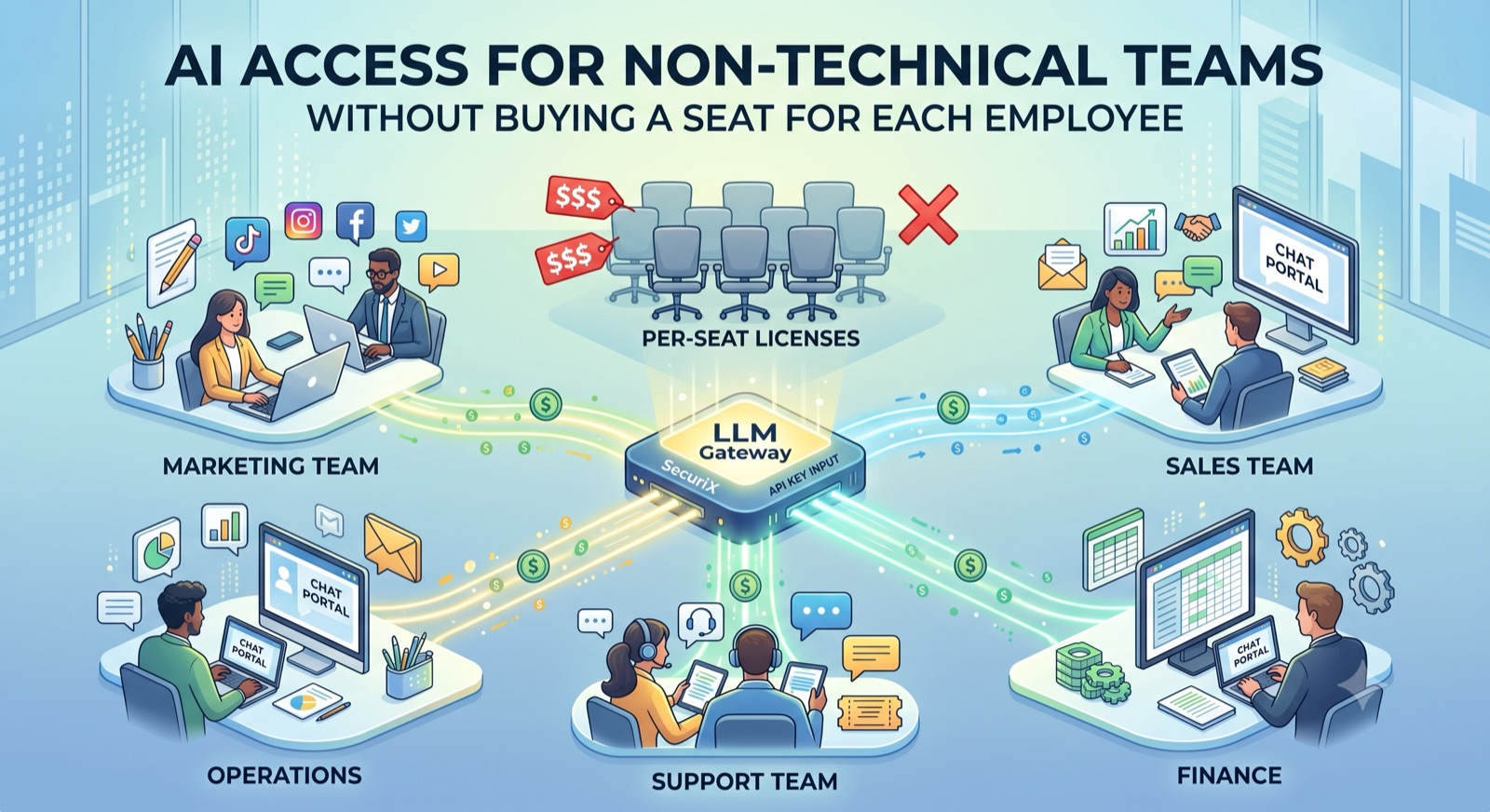
Instead of buying a license per person, you connect one Chat API key from OpenAI, Anthropic, or Azure OpenAI to an LLM gateway, and give employees access through a company chat portal behind single sign-on.
The mechanics are simple:
- One key, many users. All company AI traffic routes through the gateway on shared credentials. There are no individual accounts to buy, provision, or reconcile.
- You pay for tokens, not seats. An employee who sends five prompts a month costs cents. An employee who sends five hundred costs what five hundred prompts cost. Nobody is subsidizing anybody.
- Access follows identity. Employees log in with existing corporate credentials, so onboarding is automatic and offboarding is instant.
This is the model that matches the usage curve instead of fighting it — and because light users are nearly free, most companies extend AI access to everyone, including the teams that were never going to get a seat, and still spend far less than they did before. We cover the full economics in AI Cost Optimization: The Complete Guide for 2026.
What Non-Technical Teams Need That Developer Tools Don't Provide
Pooled billing solves the cost problem. But rolling AI out to non-technical teams has requirements that engineering-focused tooling never had to think about.
A chat interface, not an API
Developers are happy with an API key and a client library. Everyone else needs a browser tab that looks like the chatbot they already know. A built-in chat portal — no installs, no configuration, works on any device — is the difference between a rollout and a rollout announcement nobody acts on.
Login with existing credentials
Asking 400 people to create accounts guarantees three outcomes: password resets, shared logins, and abandonment. SSO with SCIM provisioning removes all three. Add someone to the right group in Okta or Entra ID and they have access; remove them when they leave and access is revoked in seconds. No account sharing, no orphaned logins, no IT ticket queue.
Guardrails that assume no security training
A support agent pasting a ticket does not stop to consider that the ticket contains a customer's phone number and card details. That is not carelessness — it is the job. A DLP engine at the gateway scans and redacts credit card numbers, phone numbers, customer emails, and SSNs before anything reaches the model, so the safe path is the default path rather than a policy people are asked to remember.
Sensible model defaults, chosen by IT
Non-technical users should not have to reason about which model is cost-appropriate for drafting an email. Model whitelisting lets IT decide what each team sees — efficient models by default for high-volume light work, premium models where the work justifies them. Users just get a dropdown that only contains right-sized options.
Budgets, so "access for everyone" stays affordable
Company-wide access without limits is a different kind of risk. Team budgets with hard enforcement at the gateway mean marketing, sales, and support each have a monthly ceiling that physically cannot be exceeded — soft alerts at 80%, hard block at 100%. You can say yes to everyone precisely because the ceiling is real.
Rolling It Out: A Practical Sequence
Start with support or marketing, not finance. Pick the team with the highest-frequency use case and the most obvious wins. Support draws the fastest adoption because the value shows up in the first hour.
Launch with the tools already connected. A portal that can read the team's Drive, Gmail, and Calendar is dramatically more useful than a blank chat box — and it removes the copy-paste habit that leaks data in the first place.
Set generous budgets first, tune later. Week one is about adoption. Once you have two weeks of real usage data, set budgets that reflect how each team actually works instead of guesses.
Then close the side doors. Once the sanctioned portal is live and people like it, block public chatbot domains at the network edge. Order matters here: blocking before you have a good replacement creates resentment and workarounds; blocking after means there is simply no reason to go around it. (More on this failure mode in Taming Shadow AI and Zombie Agents.)
Report costs by team from month one. When each department can see its own consumption against its budget, AI spend becomes self-regulating instead of a central fight.
Frequently Asked Questions
What is the best way to give non-technical teams AI access? Route all company AI through a shared LLM gateway and give employees a browser-based chat portal behind SSO. You pay for tokens consumed rather than a license per person, which suits the light, high-frequency usage typical of marketing, sales, support, and operations teams.
Is this cheaper than buying seats for everyone? For non-technical teams, substantially — usually 60–80% less. Their usage profile (short prompts, moderate frequency, no need for frontier models on most tasks) costs a few dollars per active user monthly at API rates, versus $240–720 per year for a seat.
Do employees need technical skills to use it? No. The portal is a chat interface reached through a normal browser login with existing corporate credentials. If someone has used a consumer chatbot, there is nothing new to learn.
How do we stop people pasting customer data into it? You do not rely on people. A DLP engine at the gateway inspects every prompt in flight and redacts PII — card numbers, phone numbers, emails, SSNs — before it reaches the model, and applies the same redaction to data returned by connected tools.
What about our engineering team — do they use this too? They can, and the audit and policy benefits apply equally. But developers using coding assistants inside their IDE have a genuinely different usage profile, and a per-seat developer tool can be worth its price. The waste concentrates in the other 70–80% of the company. See SecuriX for Developers for the engineering-side view.
How long does rollout take? The technical work is typically under a day: connect a Chat API key, configure SSO, share the portal link. Calendar time goes to change management and existing contract cycles, not engineering.
The Bottom Line
The AI tooling market spent three years building for developers, and it built well. But the majority of every company is not developers — and those teams have been offered the same pricing model with none of the usage to justify it.
Giving marketing, sales, support, and operations teams AI does not require a seat for each of them. It requires a shared gateway, a chat portal they can log into with credentials they already have, guardrails that assume no security training, and budgets that make company-wide access safe to approve.
SecuriX ships all of that as one deployment: pooled pay-per-token billing, an SSO chat portal with MCP tools attached, DLP at the gateway, model whitelisting, and per-team budgets with hard enforcement.
Book a Demo
See how to roll out AI across every team in your company — without buying a seat for each employee.
To size the savings for your own headcount, try the calculator on our AI cost optimization page — or read the complete guide to AI cost optimization for the full playbook.
— The SecuriX Team
See SecuriX in front of your own traffic.
Tell us where to reach you and we'll set up a walkthrough with your identity provider, your policies, and your budget structure.